Introductory Offer


Recruiting Videos Start on the Sideline
I-TRX films your athlete every game, so when it’s time to reach out to college coaches, the footage is already on your phone.
College coaches can’t be at every game. Most of the time, the first look they get at your athlete is on video.
That’s a problem if all you have is a few shaky clips from the bleachers. It’s even worse if your kid is a tiny dot in a wide shot of the whole field.
I-TRX gives you close-up footage of one player, your player, every game of every season.
Why Recruiting Film Matters
Coaches want to see how your athlete plays in real games, not just stats on a profile.
Good film shows them:
-
How your athlete moves with and without the ball
-
How they make decisions under pressure
-
How they compete, play after play
-
What they can do in their position
-
The clearer the footage, the easier it is for a coach to say “I want to see more.”


How I-TRX Captures Recruiting Footage
Your athlete wears a small sensor pack.
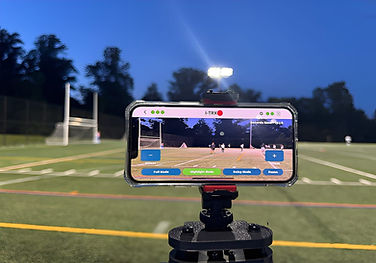
The I-TRX base reads the sensor and moves your iPhone to follow them across the field
Auto-zoom keeps them big in the frame, even from up to 500 feet away.
-
Close-up footage of one athlete, not a wide shot of 22 players
-
Full game recordings saved in 1, 2, 5 or 10-minute clips
-
Highlight Mode saves a 30-second or 1-minute clip of a big play with one tap.
-
Everything saves to your iPhone camera roll, so there’s no cloud upload and no SD card
Works for soccer, lacrosse and field hockey.
From Highlight to Highlight Reel
I-TRX isn’t editing software. It does the hard part, getting great footage, so the editing is easy.
-
Tap Highlight Mode during the game. Big save, big goal, big tackle, one tap saves it.
-
Find your clips in your camera roll. No downloading or transferring.
-
Open iMovie on your iPhone. It’s free and already on most iPhones.
-
Drop in your best clips and trim them.
-
Export and share. Send the reel to coaches, post it to a recruiting profile, or share it with family.


Tips for a Reel Coaches Will Watch
-
Lead with your best plays. Coaches often decide in the first 30 seconds.
-
Keep it short. A few minutes of strong clips beats 15 minutes of everything.
-
Show your position. A defender’s reel should show defending. A goalie’s should show saves.
-
Add your info up front. Name, grad year, position, club team and contact info.
-
Keep the full games too. Many coaches ask to see a full game after the reel. With I-TRX, you’ll have them.
Want the full list? See our highlight video checklist and recruiting video format guide
Start Filming Before Recruiting Starts
The best time to start building recruiting film is before your athlete needs it. Filming every season gives you a record of how they’ve grown, and a library of plays to choose from when the time comes.
And it’s not just for recruiting. It’s every first goal, every big save and every season you’ll want to look back on.

Free Recruiting Guides for Parents
Not sure where to start with college recruiting? We put together two free guides to walk you through the first steps.
One Camera. Every Season. No Subscription.
You pay $649 once. No yearly fees, no team plan, no other parents to coordinate with.
Got more than one athlete? Share I-TRX between siblings. One wears the sensor Saturday, the other on Sunday.
Filming soccer? See I-TRX for soccer.
Playing lacrosse? See I-TRX for lacrosse.
Comparing cameras? See how I-TRX stacks up.
Frequently Asked Questions
Is I-TRX a video highlight maker?
I-TRX captures the footage and saves your highlights with one tap. To put them together into a reel, you can use iMovie, which is free on iPhone.
Do I need to buy editing software?
No. Your highlight clips and full games save straight to your camera roll, so you can edit them in iMovie or any app you already use.
Can I send coaches full game footage?
Yes. I-TRX records the whole game in clips that you choose, from 1 to 10 minutes long.
When should we start filming for recruiting?
The sooner the better. Filming every season gives you more plays to choose from and shows coaches how your athlete has grown.
Does I-TRX work with Android?
Not yet. I-TRX works with iPhone today, and Android support is coming in early 2027.
What if I don’t like it?
Try it for 30 days. If you don’t love it, send it back for a full refund.
